Configuration
The Configure section of the Pomerium Enterprise Console houses settings that affect the entirety of the Console environment (across all Namespaces). Adjust these settings with care.
Licenses
The Pomerium Enterprise Console requires an Enterprise License to use. A free trial Enterprise License can be obtained through the Enterprise Console UI on the Licenses tab:
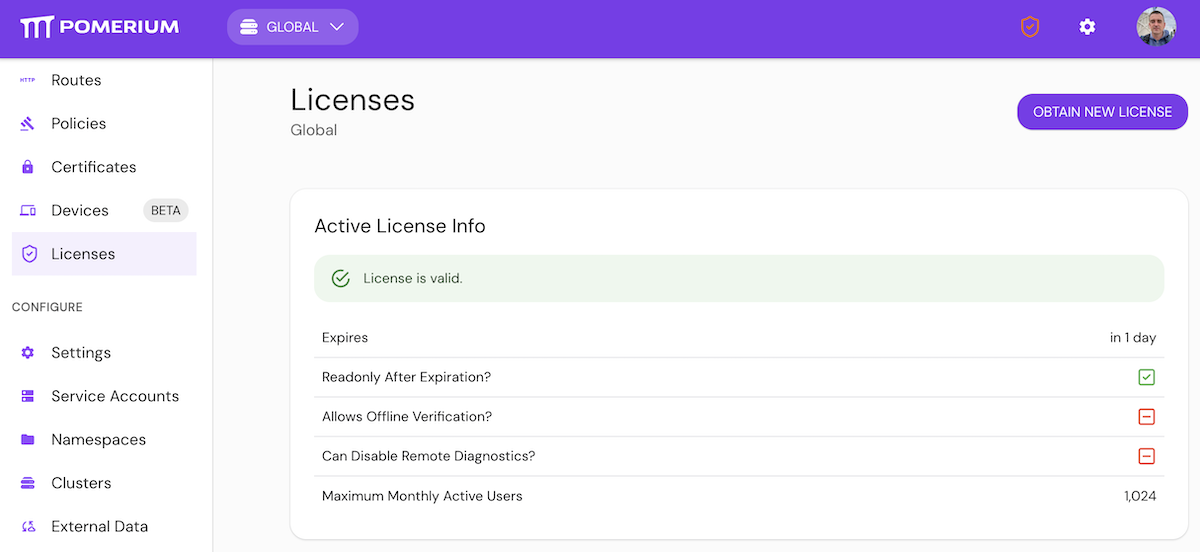
An Enterprise License can also be supplied from the command line via the license-key option. Licenses require online validation, unless the license-key-validate-offline option is used and the license supports offline validation.
Outbound Network Requirements
Pomerium Enterprise Console may require outbound HTTPS (TCP 443) access to:
api.keygen.shfor online license verificationraw.githubusercontent.comfor the Tor exit node list when that data source is enabledanalytics.pomerium.comfor Pomerium usage analytics.sentry.iofor Sentry error reporting - see https://docs.sentry.io/security-legal-pii/security/ip-ranges/
Directory Sync
Directory sync enumerates users and groups from a directory provider so Pomerium Core can use directory-backed identity data. In the Console, go to Settings > Directory Sync. The tab shows Identity Provider, Polling Min Delay, and Polling Max Delay. Identity Provider renders a provider selector with None as the empty value; leaving it empty disables directory sync. When a provider is selected, the Console shows provider-specific options below the selector.
When the Console exports settings to Core, Identity Provider maps to directory_provider, the provider-specific values map to directory_provider_options, Polling Min Delay maps to directory_provider_refresh_interval, and Polling Max Delay maps to directory_provider_refresh_timeout. The Console runs the directory sync itself. Core does not use the refresh interval or refresh timeout; it only stores them, and passes them to the Console when Core launches the Console.
You can seed the same persisted Console settings at startup with directory_provider, directory_provider_options, directory_provider_refresh_interval, and directory_provider_refresh_timeout in config.yaml, or with the matching environment variables in the table below. If unset, both default to 10m.
directory_provider_refresh_interval (Polling Min Delay) is both the interval between syncs and the timeout for a single sync attempt. directory_provider_refresh_timeout (Polling Max Delay) caps the delay between retries after failed sync attempts. Despite its name, it does not limit how long an attempt can run. To give a slow sync more time, increase directory_provider_refresh_interval. See Identity Provider Polling Min/Max Delay for a diagram of how the two settings interact.
Auto-Apply Changesets
auto_apply_changesets controls whether configuration changesets apply automatically (true) or wait for an administrator to apply them (false). The Enterprise Console has no UI control for it; set it through the Console management API. Pomerium Zero exposes it as the Auto-apply changesets toggle under Settings > Advanced.
Variables
The keys listed below can be applied in Pomerium Console's config.yaml file or as environment variables.
All values are case sensitive unless otherwise noted.
- Environment variables
- Config file keys
| Name | Description | Default Value |
|---|---|---|
| #ADMINISTRATORS | A list of user ids, names or emails to make administrators. Useful for bootstrapping. | none |
| #AUDIENCE | A list of audiences for verifying the signing key. | [] |
| #AUTHENTICATE_SERVICE_URL | (deprecated) Authenticate service URL is not required in the Console configuration. For Device Enrollment, use the external route URL. | none |
| #BIND_ADDR | The address the Pomerium Console will listen on. | :8701 |
| #BOOTSTRAP_SERVICE_ACCOUNT | Enable the bootstrap service account. | false |
| #CACHE_DIR | Directory to use for caching. | Cache only in memory. |
| #CUSTOMER_ID | The customer ID | none |
| #DATABASE_ENCRYPTION_KEY | The base64-encoded encryption key for encrypting sensitive data in the database. | none |
| #DATABASE_ENCRYPTION_KEY_FILE | Loads base64-encoded database-encryption-key secret from a file. | none |
| #DATABASE_ENCRYPTION_KEY_RAW_FILE | Loads database-encryption-key secret from a raw file. Setting this option from a raw file does not require base64 encoding. | none |
| #DATABASE_URL | The database Pomerium Enterprise Console will use. | postgresql://pomerium:pomerium@localhost:5432/dashboard?sslmode=disable |
| #DATABROKER_SERVICE_URL | Databroker service URL for Console to reach Core. Leave unset in the default single-process deployment (Console uses http://localhost:5443). Set only when the databroker runs on another host/port or Core is split/remote. | http://localhost:5443 |
| #DEBUG_CONFIG_DUMP | Dumps the Databroker configuration. This is a debug option to be used only when specified by Pomerium Support. | false |
| #DIRECTORY_PROVIDER | Directory-sync provider Pomerium uses to enumerate users and groups. Empty disables directory sync. | none |
| #DIRECTORY_PROVIDER_OPTIONS | Provider-specific options for the directory provider, as a JSON object. | none |
| #DIRECTORY_PROVIDER_REFRESH_INTERVAL | How often the Console syncs the directory, and the timeout for a single sync attempt (Polling Min Delay). | 10m |
| #DIRECTORY_PROVIDER_REFRESH_TIMEOUT | Maximum delay between retries after failed sync attempts (Polling Max Delay). Does not limit how long a sync attempt can run. | 10m |
| #DISABLE_FEEDBACK_WIDGET | Disables third-party feedback widget and removes it from the Enterprise Console. | false |
| #DISABLE_REMOTE_DIAGNOSTICS | Disable remote diagnostics. | true |
| #DISABLE_VALIDATION | (deprecated, please update your configuration to set VALIDATION_MODE=none instead) Disable config validation. | false |
| #GRPC_ADDR | The address to listen for gRPC on. | :8702 |
| #HELP | help for serve | false |
| #LICENSE_KEY | Provide the license key issued by your account team. | none |
| #LICENSE_KEY_VALIDATE_OFFLINE | Disable online validation of the license key. | false |
| #OVERRIDE_CERTIFICATE_NAME | Overrides the certificate name used for the databroker connection. | none |
| #PROMETHEUS_DATA_DIR | The path to Prometheus data | none |
| #PROMETHEUS_LISTEN_ADDR | When set, embedded Prometheus listens at this address. Set as host:port | 127.0.0.1:9090 |
| #PROMETHEUS_SCRAPE_INTERVAL | The Prometheus scrape frequency | 10s |
| #PROMETHEUS_URL | The URL to access the Prometheus metrics server. | none |
| #SHARED_SECRET | The base64-encoded secret for signing JWTs, shared with OSS Pomerium. | none |
| #SHARED_SECRET_FILE | Loads base64-encoded shared-secret from a file. | none |
| #SHARED_SECRET_RAW_FILE | Loads shared-secret from a raw file. Setting this option from a raw file does not require base64 encoding. | none |
| #SIGNING_KEY | (deprecated) base64-encoded signing key (public or private) for verifying JWTs. This option is no longer required in the Console config. | none |
| #SIGNING_KEY_FILE | Loads base64-encoded signing-key secret from a file. | none |
| #SIGNING_KEY_RAW_FILE | Loads signing-key secret from a raw file. Setting this option from a raw file does not require base64 encoding. | none |
| #TLS_CA | base64-encoded string of tls-ca | none |
| #TLS_CA_FILE | file storing tls-ca | none |
| #TLS_CERT | base64-encoded string of tls-cert | none |
| #TLS_CERT_FILE | file storing tls-cert | none |
| #TLS_DERIVE | Derives TLS server certificate for the console HTTPS and gRPC endpoints for the host specified by this option, using the CA derived from the shared key. Uses this CA to verify the server certificate presented by the Databroker gRPC TLS when the tls_derive option is set in the Pomerium Core. | none |
| #TLS_INSECURE_SKIP_VERIFY | Disable remote hosts TLS certificate chain and hostname checks. | false |
| #TLS_KEY | base64-encoded string of tls-key | none |
| #TLS_KEY_FILE | file storing tls-key | none |
| #USE_STATIC_ASSETS | When false, forward static requests to localhost:3000. | true |
| #VALIDATION_MODE | Validates config based on the specified mode: full (The default config validation mode), static (A "light" validation mode that catches most config issues), or none (Disables config validation). | full |
| Name | Description | Default Value |
|---|---|---|
| #administrators | A list of user ids, names or emails to make administrators. Useful for bootstrapping. | none |
| #audience | A list of audiences for verifying the signing key. | [] |
| #authenticate_service_url | (deprecated) Authenticate service URL is not required in the Console configuration. For Device Enrollment, use the external route URL. | none |
| #bind_addr | The address the Pomerium Console will listen on. | :8701 |
| #bootstrap_service_account | Enable the bootstrap service account. | false |
| #cache_dir | Directory to use for caching. | Cache only in memory. |
| #customer_id | The customer ID | none |
| #database_encryption_key | The base64-encoded encryption key for encrypting sensitive data in the database. | none |
| #database_encryption_key_file | Loads base64-encoded database-encryption-key secret from a file. | none |
| #database_encryption_key_raw_file | Loads database-encryption-key secret from a raw file. Setting this option from a raw file does not require base64 encoding. | none |
| #database_url | The database Pomerium Enterprise Console will use. | postgresql://pomerium:pomerium@localhost:5432/dashboard?sslmode=disable |
| #databroker_service_url | Databroker service URL for Console to reach Core. Leave unset in the default single-process deployment (Console uses http://localhost:5443). Set only when the databroker runs on another host/port or Core is split/remote. | http://localhost:5443 |
| #debug_config_dump | Dumps the Databroker configuration. This is a debug option to be used only when specified by Pomerium Support. | false |
| #directory_provider | Directory-sync provider Pomerium uses to enumerate users and groups. Empty disables directory sync. | none |
| #directory_provider_options | Provider-specific options for the directory provider, as a JSON object. | none |
| #directory_provider_refresh_interval | How often the Console syncs the directory, and the timeout for a single sync attempt (Polling Min Delay). | 10m |
| #directory_provider_refresh_timeout | Maximum delay between retries after failed sync attempts (Polling Max Delay). Does not limit how long a sync attempt can run. | 10m |
| #disable_feedback_widget | Disables third-party feedback widget and removes it from the Enterprise Console. | false |
| #disable_remote_diagnostics | Disable remote diagnostics. | true |
| #disable_validation | (deprecated, please update your configuration to set validation_mode=none instead) Disable config validation. | false |
| #grpc_addr | The address to listen for gRPC on. | :8702 |
| #help | help for serve | false |
| #license_key | Required: Provide the license key issued by your account team. | none |
| #override_certificate_name | Overrides the certificate name used for the databroker connection. | none |
| #prometheus_data_dir | The path to Prometheus data | none |
| #prometheus_listen_addr | When set, embedded Prometheus listens at this address. Set as host:port | 127.0.0.1:9090 |
| #prometheus_scrape_interval | The Prometheus scrape frequency | 10s |
| #prometheus_url | The URL to access the Prometheus metrics server. | none |
| #shared_secret | The base64-encoded secret for signing JWTs, shared with OSS Pomerium. | none |
| #shared_secret_file | Loads base64-encoded shared-secret from a file. | none |
| #shared_secret_raw_file | Loads shared-secret from a raw file. Setting this option from a raw file does not require base64 encoding. | none |
| #signing_key | (deprecated) base64-encoded signing key (public or private) for verifying JWTs. This option is no longer required in the Console config. | none |
| #signing_key_file | Loads base64-encoded signing-key secret from a file. | none |
| #signing_key_raw_file | Loads signing-key secret from a raw file. Setting this option from a raw file does not require base64 encoding. | none |
| #tls_ca | base64-encoded string of tls-ca | none |
| #tls_ca_file | file storing tls-ca | none |
| #tls_cert | base64-encoded string of tls-cert | none |
| #tls_cert_file | file storing tls-cert | none |
| #tls_derive | Derives TLS server certificate for the console HTTPS and gRPC endpoints for the host specified by this option, using the CA derived from the shared key. Uses this CA to verify the server certificate presented by the Databroker gRPC TLS when the tls_derive option is set in the Pomerium Core. | none |
| #tls_insecure_skip_verify | Disable remote hosts TLS certificate chain and hostname checks. | false |
| #tls_key | base64-encoded string of tls-key | none |
| #tls_key_file | file storing tls-key | none |
| #use_static_assets | When false, forward static requests to localhost:3000. | true |
| #validation_mode | Validates config based on the specified mode: full (The default config validation mode), static (A "light" validation mode that catches most config issues), or none (Disables config validation). | full |